Updated 2026
Buying a new computer for your business should be fairly straightforward.
In reality, you’re faced with different processors, memory, storage, Windows versions and a long list of specifications that don’t mean very much if you don’t buy computers every day.
And most business owners shouldn’t need to become PC experts just to buy a machine that works properly.
So, here’s the simple version first.
What PC should I buy for my business?
For most people using Outlook, Teams, Word, Excel, SharePoint, OneDrive and browser based business applications, we would currently look for:
16GB of memory
512GB of SSD storage
A modern business class processor
Windows 11 Pro
A good quality business grade PC or laptop
That gives the average office user a responsive machine with enough capacity for the way most of us work today, without paying for performance they’re unlikely to use.
Some people will need more. Others may comfortably manage with less.
The important bit is matching the computer to the person using it.
If that’s all you wanted to know, you probably don’t need to worry too much about the technical detail below.
If you’re responsible for buying computers for your business, however, there are a few things worth understanding before you place the order.

Start with the person, not the PC
Before looking at processors, memory or storage, think about what the person actually does.
Someone who spends most of the day in Outlook, Teams, a browser and an accounts package doesn’t necessarily need the same computer as someone working with huge Excel spreadsheets, Power BI, CAD or creative software.
Likewise, someone regularly moving between home, office and customer sites may benefit far more from a good laptop, battery and docking setup than from spending the same money on additional processing power.
There isn’t one “best business PC”.
There’s a right PC for the job.
Three questions are a useful place to start:
What does this person actually use their computer for?
Will they mainly work at a desk or move between locations?
How long do we expect to keep the computer?
Those answers will usually tell you more than starting with a manufacturer’s specification sheet.
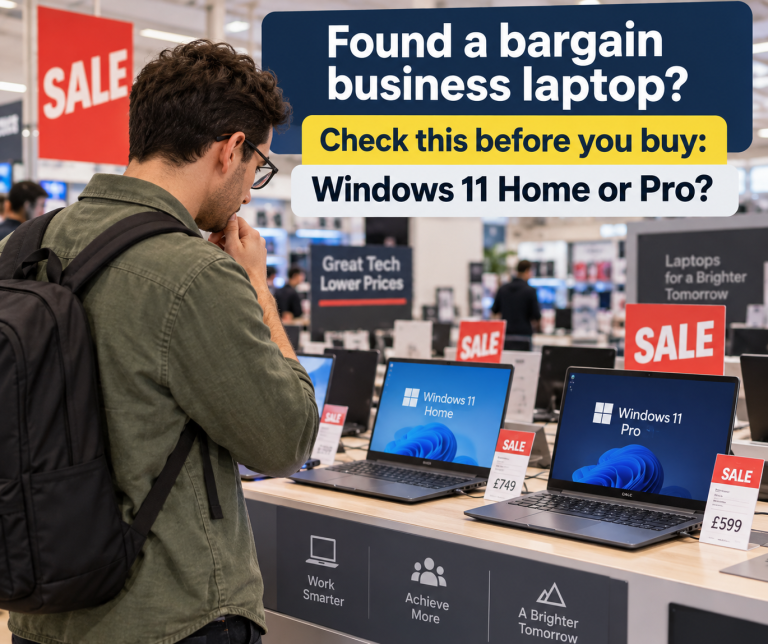
Don't be caught out by Windows 11 Home
This is an easy mistake to make.
We’ve seen businesses find what looks like a great deal online or in a retailer. The processor looks good, there’s plenty of memory and storage and the price is considerably cheaper than a similar business PC.
Then it arrives with Windows 11 Home.
There’s nothing wrong with Windows 11 Home for its intended use. It will happily run familiar applications such as Outlook, Word, Excel and Teams.
The problem is that a computer being used for work isn’t necessarily the same thing as a properly configured business computer.
Windows 11 Pro includes business features that Home doesn’t. For example, Microsoft confirms that Windows Home editions don’t support joining a computer to Microsoft Entra ID, something many Microsoft 365 businesses use to connect company owned computers to their organisation. Windows Pro also provides additional business networking and security capabilities.
That’s why we would normally specify Windows 11 Pro for a company owned business PC.
And this is where comparing computers purely on price can catch you out.
Two PCs might both have 16GB of memory, a 512GB SSD and what appears to be the same processor, but that doesn’t necessarily make them equivalent.
If the cheaper one immediately needs a Windows upgrade to make it suitable for your business environment, it wasn’t quite the bargain it appeared to be.
A PC can have all the right hardware and still be the wrong computer for your business.
Why the cheapest Windows 11 PC isn't necessarily the cheapest option
The same principle applies to the hardware.
Microsoft’s official minimum requirements for Windows 11 include 4GB of memory, 64GB of storage, TPM 2.0 and a compatible processor.
But there’s an important distinction between:
“Will Windows 11 run on this computer?”
and
“Is this a computer I’d want somebody using for work every day for the next few years?”
Your team isn’t simply running Windows.
They may have Outlook open, a Teams call running, several browser tabs, Excel, OneDrive or SharePoint synchronising in the background and security software working away at the same time.
That’s why we wouldn’t choose a business PC simply because it meets Microsoft’s minimum requirements.
Sometimes spending a little more at the outset makes considerably more sense than saving money on a machine that feels slow or needs replacing sooner.
What we would normally recommend for an office PC in 2026
For a typical SME office user, this is where we would start.
16GB memory
Memory, or RAM, is the working space your computer uses while applications are running.
Microsoft’s minimum requirement is only 4GB, but that’s very different from what we’d choose for someone working across Microsoft 365 all day.
For a new primary business PC, we’d generally specify 16GB.
That gives Outlook, Teams, browsers and other everyday applications room to work comfortably together and gives the machine some headroom for the future.
512GB SSD storage
Most modern business PCs now use solid state storage rather than the traditional mechanical hard drives found in older computers.
For the majority of businesses using SharePoint, OneDrive and other cloud services, 512GB is a sensible starting point.
Not everyone needs huge amounts of local storage, but we’d rather leave comfortable working space than specify the absolute minimum.
A modern business class processor
This is where buying PCs can become unnecessarily complicated.
Intel Core i5, Core Ultra 5, AMD Ryzen 5, different generations, different model numbers and numerous variations within each family can make comparisons difficult.
For most office users, we’d concentrate less on chasing the fastest processor and more on choosing a reasonably current business class processor appropriate for the workload.
Microsoft itself maintains lists of processors supported by Windows 11, so we wouldn’t rely simply on a processor’s age or generation to determine compatibility.
Windows 11 Pro
As we’ve already covered, this is one specification that’s easy to overlook.
For a company owned machine that needs to fit properly into a managed Microsoft business environment, we’d normally specify Windows 11 Pro rather than Home.
Business grade hardware
The specifications aren’t the whole story.
Business ranges from manufacturers such as Lenovo, HP and Dell are designed with business use in mind.
Depending on the model, that can mean differences in build quality, warranty options, docking support, repairability and the length of time a particular range remains available.
For a business buying several machines, consistency also matters. Having a fleet of completely different consumer laptops bought whenever somebody spotted a special offer can make support and replacement more complicated than it needs to be.
Is 8GB of RAM still enough for Windows 11?
Simple answer is it depends, it might be.
If you already have an 8GB Windows 11 computer that’s secure, reliable and performing well for the person using it, we’re not suggesting you replace it simply because it has 8GB of memory.
For lighter workloads, 8GB can still be perfectly usable.
But that’s different from buying a new primary business computer with 8GB today.
Computers rarely get asked to do less as they get older. Applications change, browsers become more demanding and the number of things we expect a PC to do simultaneously tends to increase.
So if we’re buying a new business computer that we hope will give several years of useful service, we’d normally choose 16GB rather than 8GB.
When would we recommend more?
Not everyone is an average office user.
We’d consider moving beyond our normal specification for someone regularly working with things such as:
- very large Excel spreadsheets
- Power BI
- CAD or technical applications
- photo or video editing
- multiple demanding applications simultaneously
- specialist line of business software
In those cases, 32GB of memory, additional storage, a higher performance processor or dedicated graphics might make sense.
The important thing is why you’re paying for it.
There’s little benefit in buying an impressive specification that the person using the computer will never actually need.
Laptop or desktop?
For most businesses, this decision is less about performance and more about how the person works.
A laptop makes obvious sense for someone working from home, travelling or moving between different locations.
Add a proper monitor, keyboard, mouse and docking station and a laptop can also provide an excellent permanent desk setup when they’re in the office.
A desktop can still be a very good choice for someone permanently based at a desk, particularly where portability provides no benefit.
Neither is automatically better.
Choose around the user.
What about AI PCs?
You’ll increasingly see manufacturers promoting AI PCs, Copilot+ PCs and processors with dedicated AI capabilities.
For some workloads, these newer processors can perform AI tasks locally on the computer rather than relying entirely on cloud processing.
That technology is developing quickly and may become increasingly relevant during the working life of a computer bought today.
But we wouldn’t replace a perfectly serviceable business PC simply because it doesn’t have an “AI PC” badge.
For the average SME buying computers today, we’d still put reliable everyday performance, security, manageability and suitability for the user first.
Already have Windows 11 PCs? Don’t replace them just because they’re older
There’s another side to all this.
Buying too little can be a false economy.
But replacing perfectly good computers unnecessarily doesn’t make much sense either.
If an existing PC is compatible with Windows 11, remains supported, is secure and performs comfortably for the person using it, there may be no good reason to replace it.
We’d rather help a client get sensible life from equipment they already own than recommend replacement simply because a computer has reached an arbitrary age.
Consistently poor performance, failing hardware, an unreliable battery, insufficient memory or an inability to meet current security and software requirements are much better reasons to start planning a replacement.
The NCSC also recommends considering how long manufacturers support devices when choosing new equipment, because continued access to updates matters to security.
For those who want the specifications
Some people want the simple recommendation.
Others really do want to compare the numbers.
So here’s a useful starting point:
| Light use or existing PC | Typical new SME PC | More demanding user | |
|---|---|---|---|
| Memory | 8GB | 16GB | 32GB+ |
| Storage | 256GB SSD | 512GB SSD | 1TB+ |
| Processor | Supported modern CPU | Recent business class CPU | Higher performance CPU |
| Windows | Windows 11 Pro preferred for managed company PCs | Windows 11 Pro | Windows 11 Pro |
| Typical use | Basic office tasks | Microsoft 365, Teams and everyday business applications | CAD, Power BI, creative or demanding workloads |
These aren’t rigid rules.
They’re a starting point for a conversation about what the person using the computer actually needs.
Windows 11 minimum requirements versus real world business use
For reference, Microsoft’s current minimum Windows 11 hardware requirements include:
- A compatible 64 bit processor with two or more cores
- 4GB RAM
- 64GB storage
- UEFI firmware with Secure Boot capability
- TPM 2.0
- DirectX 12 compatible graphics
Those requirements tell you whether a computer can run Windows 11. They don’t tell you whether it’s the computer we’d choose for somebody working on it for eight hours a day.
That’s why our practical recommendations are higher.
Frequently Asked Questions
What specification PC should I buy for business use in 2026?
For most Microsoft 365 office users, we’d start with 16GB memory, 512GB SSD storage, Windows 11 Pro and a modern business class processor.
The right specification ultimately depends on what the person actually does.
Is Windows 11 Home suitable for a business PC?
It can run business applications, so it’s not that Windows Home simply stops you using a computer for work.
The problem is that Home doesn’t support some capabilities commonly required for company managed computers, including Microsoft Entra join. Windows 11 Pro provides additional business networking and security capabilities.
For that reason, we’d normally specify Windows 11 Pro for a company owned business PC.
Is 8GB RAM enough for Windows 11?
It can be for lighter workloads and may be perfectly adequate on an existing computer.
For a new primary business PC in 2026, we’d generally choose 16GB to provide more room for everyday multitasking and future requirements.
Should I replace an older PC that already runs Windows 11?
Not automatically.
If it’s supported, secure, reliable and still performs well for the person using it, there may be no reason to replace it yet.
Is a laptop or desktop better for business?
Neither is inherently better.
A laptop suits mobile and hybrid users. A desktop can make excellent sense for someone permanently based at a desk.
Choose according to how the person works.
How long should a business PC last?
There’s no single replacement age that applies to every computer.
We’d look at performance, reliability, warranty, security requirements and whether the computer still meets the needs of the person using it.
Not sure what your team actually needs?
If you’re replacing one computer, choosing between two specifications probably isn’t too difficult.
If you’re planning to replace 10, 20 or 50 of them, it’s worth spending a little more time getting it right.
Not everybody necessarily needs the same machine.
We can look at what your team actually uses, what you already have and what you’re likely to need over the next few years, then help you work out where it’s worth spending more and where it isn’t.
Planning a PC refresh? Talk to us before you start ordering.